

ForkLift is designed to be the fastest, most powerful file manager for the Mac. Connect to FTP or SFTP servers, manage your Amazon S3 account or your mobile devices over Bluetooth. All these features are beautifully integrated into a sophisticated, yet easy to use Cocoa based interface. Dual-pane view will dramatically increase your productivity along with state-of-the-art features like live preview, spring loaded folders and any-to-any workflow. All this to be topped by tabs, to keep your workspace nice and clean.
Truth to be told I am not sure exactly what I think of Forklift ($29.95). I feel that I should like it as it does most of the things that it claims to. It is also very much one of the “applications of the moment” in terms of reviews and hype, and it integrates with that other ‘must have’ of the week an Amazon S3 account. On the other hand I am becoming increasingly ‘old and grumpy’ about the disposable nature of the market at the moment, and the “It’s just $30” type of argument.
Let me try and explain ……..
I use Yummy ($25) as my FTP client. I have used it for ages now and it does everything I think I want. Sure I am not a pro level user but I hammer it pretty hard most days.
From day one of owning my Mac I have used AppZapper ($12.95) to delete unwanted or unused applications and keep things tidy. Sure certain applications need a uninstaller to be cleaned up totally and others require some tidying up of the library but that is always going to be the case.
For burning DVD’s I use Disco ($29.95) which does a pretty good job of splitting large files over a number of DVD’s.
So that is $67.90 invested in applications already that if I purchased ForkLift I would be making redundant. So my logic is that this cost needs to be added to the ForkLift cost making ForkLift $97.85, as that is the real cost to me of dumping.
So the real question becomes is ForkLift worth $100?
Now of course if you don’t have an FTP client already, use the Burn option in the Finder and have just let your applications accumulate then you don’t have the same ‘issue’ but I would venture to say that you don’t have the need either for something like ForkLift, so my argument still holds good in my book. And before you think I am picking on ForkLift I have exactly the same view of Transmit ($29.95)!
So the only thing that I can’t currently do with my applications that ForkLift will do is my Amazon S3 backups. Well two points¨:
Paul wrote a great post on how to do this Do I really need it when for over a year I have happily dragged the html folder over to my Mac as a back up and used wp BackUp to secure the content, which is basically all created in Mars Edit so is backed up there as well
So do I like it? Yes I do!
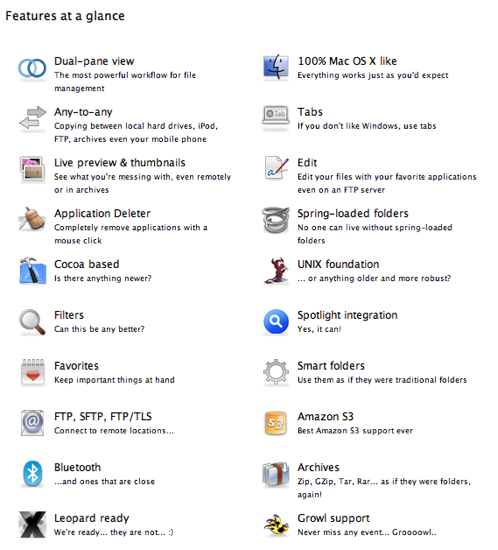
Do I need it? I really don’t think so. By way of examples take two really cool features, droplets and Split-Combine. Basically droplets allows you to preset certain actions and have an icon on your desktop. This was actually pretty useful and good fun, until I got fed up with the clutter on my desktop! Split-Comine is a very efficient way of splitting really (really) large files and determining how you want them spread over your DVD/CD. Again, very cool but at the end of the day Disco does that well enough for the very rare occasion that I have more data to transfer to DVD than space on the DVD.
The dual pane is ‘old hat’ to be honest, every FTP client has it. Sure it is more productive but it isn’t revolutionary. Whatever you may want or think it will not do away with the Finder, you are still going to be stuck with that whichever way you turn.
By now I wanted a second opinion so as I asked Danny what he thought:
Initial Impressions
Bit daunting Big window Very different to Finder Wishes
Hover over to reveal long file names Double clicking on volumes/folders opened in Forklift not Finder A way of specifying an opening location for both panes Best Features
Droplets worked well Dual pane interface is exceedingly useful, so are tabs. Conclusions
Good at what it does – FTP, file management Not a Finder replacement ‘ Finder can’t be shut down
So there you have it, nothing at all wrong with it, but a suspicion that it is somewhat over hyped, and probably doesn’t give you that much more than you already have, especially for the potential total cost associated with the purchase.

I agree with your calculations, except that I did make the jump, and dropped Transmit and Pathfinder. Now I just have Forklift, and it does all these software did, and a lot more, and it’s all integrated in one package.
And seeing what the Forklift crew did so far, I really think they’ll manage to stay on top of things for some time still (they had S3 functionality as early as May/June).
Cool. I think my ‘concern’ more than anything is for the new switcher or ‘novice’ type user who could end up swapping and chnaging applications to ‘keep up’ with the latest ‘must have’. The experienced and more discerning user has the ability to make their own informed decisions.
I am not that big a fan of the ForkLift UI to be totally honest.
One point we missed there Chris:
If a user doesnt have Transmit, AppZapper etc – theyve saved themselves $70 as forklift does fulfill these tasks. But as written in the review – I am no real fan purely as I have it all already and it is no Finder replacement. The fact was whenever I was in the finder I wasnt thinking “gosh I wish I was in Forklift” which a finder replacement should do.
I don’t like the interface as well. It feels like the old times Norton Commander that was brought back to life in a new and ugly interface. Fuctionality is nice, but one problem with this program is that it is slow to open. To me a file manager should open pretty much instantly. I will stick to finder for now.
@Danny – true, but I find it hard to imagine a nebiew diving in at this level, therefore they will probably pick up AppZapper along the way as it seems to feature on pretty much every Top 10
@Mac – I found it somewhat slow as well, and have stuck with the Finder now!
@Chris. Agreed I would say the main attraction would be the FTP functions.
@Danny. I like the fact that it has all of these functions, but as an FTP client there are better and faster ones out there, and some are free. So unfortunately this program has lost it. Pathfinder is another alternative, but just like this one it is too slow to open even on my Mac Pro.
@Mac – Yes I agree the launch time for Forklift was apauling. I would possibly disagree with the fact that there are better free FTP clients. There are definitely better for the same price of cheap (Transmit and Flow [soon]) spring to mind.
However, the only free client I have ever used was CyberDuck and that was apauling.
I will be an early adopter of Flow when it comes out it looks like it is going to surpass all others by quite a way.
Flow does look very cool. And in case you don’t know what it is here is the web site:
http://www.extendmac.com/flow/
I will have to have a look at this Flow. Thanks for the link.
Pingback: PathFinder 5 | Chris Marshall