
Photonic ($25) is a cool Flickr client for your Mac that allows you to upload, browse and search your photos in a very ‘Mac like’ way. It is also Leopard only, so if you don’t use Leopard, or don’t use Flickr, then this isn’t going to be any use for you. You should still take a look at it though as it is a very well thought out application, with a good user interface and some pretty useful features that take it beyond other Flickr clients that I have used.
What They Say
Working with a lot of photos to upload can be a pain, especially with any sort of web-based interface. No matter how well-designed the interface is, you’re still in a web browser and suffer from the limitations therein. The answer to effectively organizing and uploading tens, or even hundreds, of photos to Flickr is to use a desktop application specifically designed to help you accomplish this task. Enter Photonic.
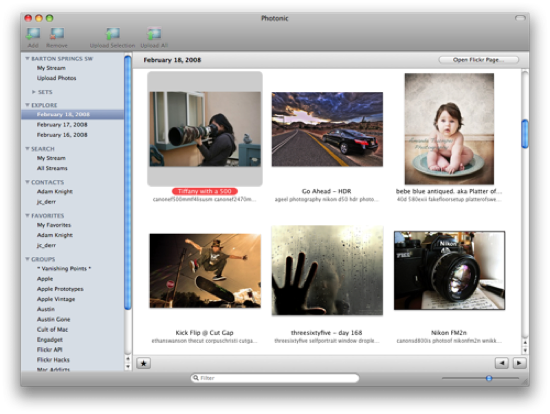
In addition to letting you upload your photos in an easy and Mac-like fashion (complete with snappy, snazzy, and non-gratuitous Core Animation feedback), Photonic is also a Flickr browser. Keep track of your contacts, groups, and even the past several days in Explore, all from Photonic. When you care to interact with a photo, right-click on it and you can be taken straight to the page on Flickr where you can read and leave comments as usual. Photonic enhances your already-excellent Flickr experience — we’d never try to take that away.
Is It Perfect?
No. It comes very close especially with the Contacts, Favorites and Groups features which give you a lot of power without going into Flickr. I also really liked the way you could look at your own sets as this is something I am always trying to remember which I have set up etc.
Uploading is a breeze, and with the ability to tag, describe and allocate to Sets or Groups is very useful indeed. The best that I have come across to date.
So why not perfect? Because I have more than one Flickr account! Although it is possible to reset the Flickr authorization it is a pain to have to keep doing it. If they had a multiple account option that would be perfect. Am I being picky? Maybe, but I reckon that a lot of people/families have more than one Flickr account on the go so maybe it is a fetaure worth considering?
All in all though a great application that is well worth a look – if you use Leopard and Flickr!.
Preferences
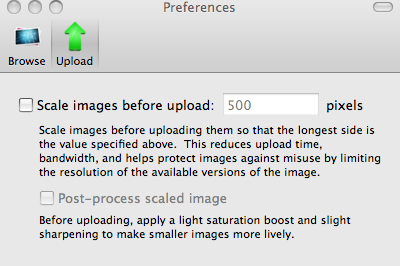
There really aren’t that many preferences to play around with but those that there are are easy to change with a neat slider bar control system, and useful enough, especially the option to resize when you upload. As I shoot the vast majority of my pictures in RAW on the Nikon D80 the image sizes are naturally big, and this is a great way to batch resize them as you upload.
Default Preferences

Upload Preferences
Features
Upload your Photos Easily
Instead of meandering through web forms or unsightly cross-platform apps, upload your photos with style and ease. You can seamlessly select loose images from the Finder or from iPhoto and then tag them, add them to sets and groups, and then upload them — all in the Way of the Mac.
Browse in Style
Browse your friends’, families’, and groups’ streams or even the last few days of Explore from within Photonic. With an iPhoto-like view, you can easily see what’s new or interesting without thumbing through page after page of photos.
Search without Interruptions
Photonic can search Flickr as well, so you can sort though Flickr for that one photo of what you’re thinking of and easily share it with friends.
System Requirements
- Mac OS X 10.5 Leopard
- 300-500MB disk space (used to keep local copies of images)
- A free or pro account at Flickr
- Photonic is a Universal Binary and works on both PowerPC and Intel Macs.
Besides the browsing the photos, how does this differ from the Flickr Uploader, that is available from Flickr?
As an uploader not that much, although is a while since I used the Flickr uploader, but I think the ability to add to Sets and Groups is better.
Should have tried the app before asking stupid questions. Anyway, the app is very cool for 1 account holder. It’s simple and very much like iphoto. Little thing that would be nice to have: stats from the flicker account, ability to leave comments on friends photos. I guess being a first version it can only get better, or so one hopes.
Flickr uploader is free and works well for me. Are you on commission Chris? 🙂
.
[quote comment=””]Flickr uploader is free and works well for me. Are you on commission Chris? 🙂
.[/quote]
I know that was a joke, but just to confirm – nope! On the rare occasion I get paid for writing anything it is a feature not a review, and I clearly state that.
Hey Chris,
I’ll give this application a try before doing any critism on it, just wanted to stop by and mention that there is some nice features for those of us that use QuickSilver … you can just select photos in IPhoto hit the key combo for the “Command window with Selection” Trigger (you need Advanced Features activated to use that), then activate the ‘Upload to Flickr’ action (requires the Flickr plugin). Optionally you can give some tags if you wish to.
Not quite as much as that App promises but handy if you want to do a quick upload directly from IPhoto.
A bit off-topic: Any reason why my Cookie from your site got dropped?
Absolutely no reason that I am aware of. Haven’t changed anything. Email me and we can set it up again.