
gtdagenda.com ($69.95 Premier Account) is a project and task management application based on David Allen’s GTD. It has the main features like Projects, Contexts and Next Actions that you would expect in an application of this sort.
It has taken me a while to get round to writing this review as my relationship with gtdagenda.com has been very stop/start. I should stress that this has nothing to do with the application but with my own blogging laziness, the fact that I haven’t really been that busy so haven’t exactly had many tasks to manage, and the ongoing debate I have with myself over the cloud life.
I am always somewhat skeptical with ‘productivity’ type applications and services as I tend to feel that you spend an age setting them up, populating them, and then forcing them into your workflow that it becomes counter productive. With gtdagenda.com I took the conscious decision that I would just let it sit there and I would allow it to worm its way into by workflow as and when it felt relevant, and I certainly wasn’t going to spend any time setting it up!! To that end I didn’t bother to look at everything that it could do as I felt that would ‘force me’ into using the features regardless of need.
As a result I have found that gtdagenda.com has eased its way naturally into my workflow. I particularly like the ability to email myself tasks and have used this a lot as a simple note/reminder type service. As with any ‘cloud’ application the more time you spend on different Macs the more useful it is, so a combination of the iPhone, Mac Pro and Mac Book Pro have worked really well with gtdagenda.com, although the Mobile option is really best used for reference rather than as a day to day tool in my opinion.
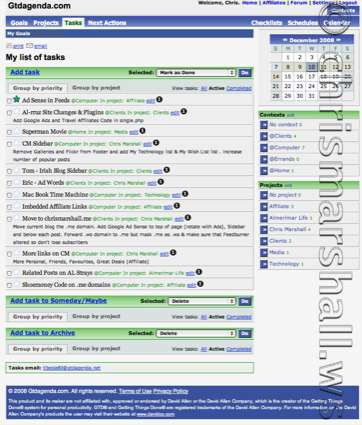
Simple, Elegant & Effective Interface
Compared to other applications that I have dabbled with or looked briefly at it seems to have a few ‘stand out’ features:
Goals
These are bigger outcomes you want to reach, with a deadline. Multiple projects can be inserted in a goal.
Checklists
For the repetitive tasks that you have to do, on a regular basis. Be it daily, weekly, monthly or yearly.
Schedules
Unlimited schedule templates, for a single day or for a 7-day period.
Calendar
Used for the tasks due dates, but also for events, memos, birthdays etc.
The tasks can be exported by email, print and iCal. A mobile version is available at Gtdagenda.mobi, a simpler interface but with almost all the features.
GTD In Action
Ken Silver has written a really good article on how he uses checklists to run his business and the role gtdagenda.com plays.
Other Reviews of GTDAgenda You May Want To Read
Affiliate
For those of you interested in affiliate marketing then when you sign up you get enrolled in their affiliate programme as you will see from the sidebar on this blog!
All things considered I like it and have found it has become a key part of my workflow process and has pushed me even further up into the clouds!
I think unless you get some “long green” for something, things tend to get put on the back burner. For a long time! 😉
Have you ever tried Things? I like it as it also has an iPhone app that syncs flawlessly. I must admit I’ve been using it for longer than the iPhone app has been out, though. It’s in “beta”, as it has been in the last two years. They are actually releasing version 1 at Macworld. This means it’s been thoroughly tested! And it’s extremely simple. Can’t beat that.
Anyway, I like it.
http://www.culturedcode.com/things/
(BTW, the reason I’ve been including the entire URL at the end of the posts instead of included as a link on the word is because of phishing. Some people like it as it shows exactly where your going to…)
“long green” ….. that some US $ reference???
Have read about Things and heard good stuff about it but never had a need to look at it. As you know I have tried this year to ‘stick to what I need’ rather than keep swapping stuff out for the sake of it 🙂
No problem regards the URL but if the URL is a REALLY long one it doesn’t wrap round and ends up overlapping out of the comment box ……. remember I had that problem before? If that does happen I will edit the URL and link it the relevant word.
Hi Chris,
Thank you for this Gtdagenda review. I’m glad you like the application.
Dan
Hmm. That “Things” looks interesting, on account of its iPod Touch integration. That’s where GTD (or even just general “to do”) apps I’ve looked at in the past have fallen down. They’re fine for when you’re at your Mac (either at home or at work) but less useful when you’re out somewhere (server room, shopping, etc).
I’d heard of it before, but had never bothered taking a look. I’m downloading it just now. Thanks Wayne!
No problem, Gary! Just let us know what you think of it.
It could well be next year, once I return to work, before I can give it a proper whirl – I don’t tend to have much need for things like this at home. Maybe see if I can at least give it a wee play with before then…
As I had nothing To Do this afternoon I decided to install Things on the iPhone and Mac Pro. Of course the fact that I have nothing To Do means I have nothing to put into it yet, but it looks nice 🙂
[quote comment=”112219″]As I had nothing To Do this afternoon I decided to install Things on the iPhone and Mac Pro. Of course the fact that I have nothing To Do means I have nothing to put into it yet, but it looks nice :-)[/quote]
Unfortunately, as any kind of To Do applications go for me, I currently have 8 items in my Today folder.
They’ve been there for days.
But it does look nice! 😀
Ha Ha!!
Well I now have it set up to sync with my iPhone and the Mac Pro and MacBook Pro and Sands iPhone and the iMac and Mac Book.
Still got nothing to do though …… but it looks very nice yes 🙂
Hmmmm not impressed with the first thing I tried To Do!!!
Set up a action on the Mac Pro and synced with the iPhone. That was fine. Installed Things on the MacBook Pro and synced with the iPhone and that was OK.
Set the task as completed on the MacBook Pro and that synced with the iPhone OK. Came back to the Mac Pro and synced with the iPhone FAIL!!! Doesn’t seem to like the concept of syncing across multiple Macs and a iPhone which would be STUPID. I mean anyone with lots To Do surely uses multiple Macs i.e. Home/Office/Travel????
Could be something that I am doing I guess so if anyone has made this work across a similar set up please feel free to make me look stupid 🙂
Have been using Things for a while now and it is obviously still very much in beta stage so I will wait to do a review.
I like the syncing with the iPhone, but not the fact that it wont sync across multiple Macs and the iPhone. It will certainly need to be able to do that before I commit to it.
Thanks for the update on the multi-machine synch issues. If I was to spend money on it, I’d want to be able to use it on both my home Mac, my office Mac and my iPod Touch, while keeping home and work things separate.
Wayne – you’re the one who mentioned this first and said that you’ve been using it for a while… Have you used it across multiple machines? If so, have you found it okay or have you had problems like Chris has?
The lack of syncing is a ‘know error’ in that they haven’t got round to doing that yet 🙂 They say that it will be done as soon as they can sort out use of MobileMe with Apple, or something along those lines.
I did read somewhere of a complicated way of doing it via use of Dropbox, but to be honest unless (or until) it works seamlessly I am not interested.
Will wait and see how things develop, and will post as soon as I know 🙂