
Using Balsamiq Mockups ($79) feels like you are drawing, but it’s digital, so you can tweak and rearrange controls easily, and the end result is much cleaner. Teams can come up with a design and iterate over it in real-time in the course of a meeting.
I am in no way a Software Developer, Designer, Engineer or any other type of Software person at all. The closest I ever come is when I have an idea that I want someone to develop, or get involved in a projcet that includes the development of a new application.
As such I may well be the wrong person to review Balsamiq Mockups in that I am not a ‘heavy’ user at all, but on the other hand I may well be an ideal reviewer in that I use it infrequently, and am a very basic user indeed. Basically as I see it, if I can use it and it works for me, then I have little doubt that it will be useful for you!
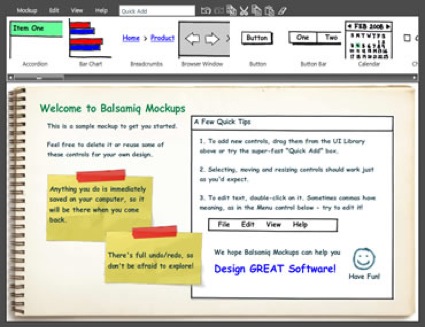
Let me say right up that the interface is very cool indeed, funky even, with a really good ‘hand drawn’ feel to it, and simple drag and drop as you would expect.
But do you know what? I really did find a use for it way beyond my initial expectation. I spend a lot of time ‘designing’ web sites and blogs, well that may be a slight over exageration of the word design, but I do spend a lot of time trying to identify and explain layouts, uses for, plugins etc etc for web sites and blogs and I found Balsamiq Mockups remarkably useful for this. Of course the toolbar is full of Mac and Blog type icons to help you do this, so don’t for one minute think that it is only for Software Developers.
I hazard a guess that anyone that doodles with a pen and paper to start the design process for anything with a GUI will find Balsamiq Mockups useful, and remarkably easy to use. For me it was a case of jump straight in and away we go, which makes it a brilliant application anyway! I wouldn’t go as far as to say it was easier or quicker than using a pencil and paper, but it isn’t an inconvenience either.
Of course it uses Adobe Air, so some may not like it at all ……
What they say about themselves
POWERFUL AND SCALABLE
With 75 pre-built controls to choose from, you can design anything from a super-simple dialog box to a full-fledged application, from a simple website to a Rich Internet Application.
SPICE UP YOUR WIKI
Mockups is tightly integrated with Atlassian Confluence, Atlassian JIRA and XWiki. We even have a desktop version for when you are offline.
GET IT DONE AS A TEAM
Product managers, designers, developers and even clients can now work together in the same tool to quickly iterate over software mockups, before writing code.
FOCUS ON FUNCTIONALITY
Balsamiq Mockups intentionally uses hand-drawn UI elements, so that people don’t get attached to “that pretty color gradient†or think that your mockup has actual code behind it and is “practically doneâ€.
DESIGNED FOR COLLABORATION
Mockups is designed to help you and your team or clients iterate on wireframes as early in the process as possible, when it’s cheapest to do so. Here are some of the features that support this goal:
- extreme speed: you can create and tweak designs in real time during a design discussion meeting, whether you’re all in the same room or sharing your screen in an online meeting.
- a look no-one is afraid to criticize: wireframes created with Mockups are intentionally rough and low-fidelity. The idea is to encourage as much feedback as possible…no-one will think you’ll be offended by their input, they’ll know immediately that you just ‘threw it together’ quickly.
- multiple ways to share and get feedback on your designs:
Mockups exports to common PNG images which can be emailed as attachments, easily embedded in a website or saved in a shared folder.
Mockups also exports to the clipboard, so that you can simply paste the snapshots to your Word or Powerpoint requirement documents and feature specifications.
If you are using a plugin version of Mockups, you will be able to embed your Mockups in your wiki pages or bug reports, with access control, versioning and all the great Web Office features you’ve come to love.
You can achieve near-real-time collaboration by coupling Mockups for Desktop with a “file sharing in the cloud” service like DropBox (learn more).
If your colleagues haven’t bought Mockups, they’ll still be able to import your XML code in the free online demo version, tweak it, export it back and email it to you.
We are currently developing an online version of Mockups (subscription-based), which will have commenting, versioning, access controls and all that good stuff. Let us know if you’d like to participate in the private beta program.