
Baseline at $20 is an application that I think I should have more of a need for than I actually do!
Where has all your disk space gone?
That is what they ask, and how they promote Baseline. The fact is mine hasn’t really gone anywhere – I know where pretty much all of the 3.55TB of disc space is attached to the Mac Pro. I certainly don’t have an issue with running out of space. Now I can accept that I have more than most and some (well many) would argue more than I actually need, but I can’t see that in this day and age of ultra cheap discs and the advent of Time Machine that most people need to optimise every last MB of space?
So what does it do:
- Superfast Disk Scanning
- Compare your disk against saved Baselines
- View only the items that have changed
- Delete, Compress or Archive items to save space
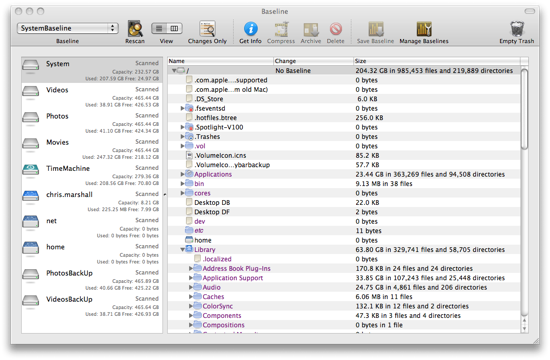
It all works around the concept of Baselines. You scan your drive to capture its current profile and create the baseline against which all future scans are measured. That way you can manage them, archive them, compare them, delete them, compress them. All of which sounds like it should be really useful, but somehow I didn’t really find any significant benefit.
This could well be me though. In my Windows days years I kept everything incredibly organised, and was always looking to optimise disc space. Baseline would have been really useful then, so I can see how it could be now. Since my move to the Mac I had adopted a totally different approach – don’t delete or file, use the power of search, and just add more disc space as and when. As such I am less worried about the benefits that Baseline provides.
It is an effective application, with some nice features. I hazard a guess that it is one for the newbie and less confident user, especially if you haven’t built up your drive capacity yet, and as such I would suggest it is worth taking a look at. I am the first to admit that I am a little OTT regards disc capacity and organisation so just because I couldn’t really find a use for Baseline doesn’t mean you wont be able to.
To be honest there are applications out there that help you see where your disk space has gone much better (grand perspective for example – which is free!). They usually are more graphical which is a much better way to represent your data.
Mind you, since it will “View only the items that have changed”, you can use it to see what has changed when you install a new item of software. All the different bits that can get stuck in all the nooks and crannies. It’s one thing watching closely when the Installer is running (assuming a package uses Apple’s installer and not the VISE, or other installers), but they won’t tell you what, if anything, a post-install script might do to move things around.
As with Grand Perspective, there are other more complex utilities around which will do the same thing – and some of them certainly for free – but they’re probably more complex. (The one that springs to mind is radmind – the computer management suite, for which this is a core function.)
‘I am the first to admit that I am a little OTT regards disc capacity and organisation’
And the impressive list of volumes in the screenshots demonstrates this beautifully!
Sounds like an interesting app, like the idea of viewing only changes – as Gary mentions it’s a nightmare with the odd bit of software that scatters itself windows style everywhere and this could be useful if only to take a screenshot for future reference.
And to think there is one more 500GB external to add to that list as well 🙂